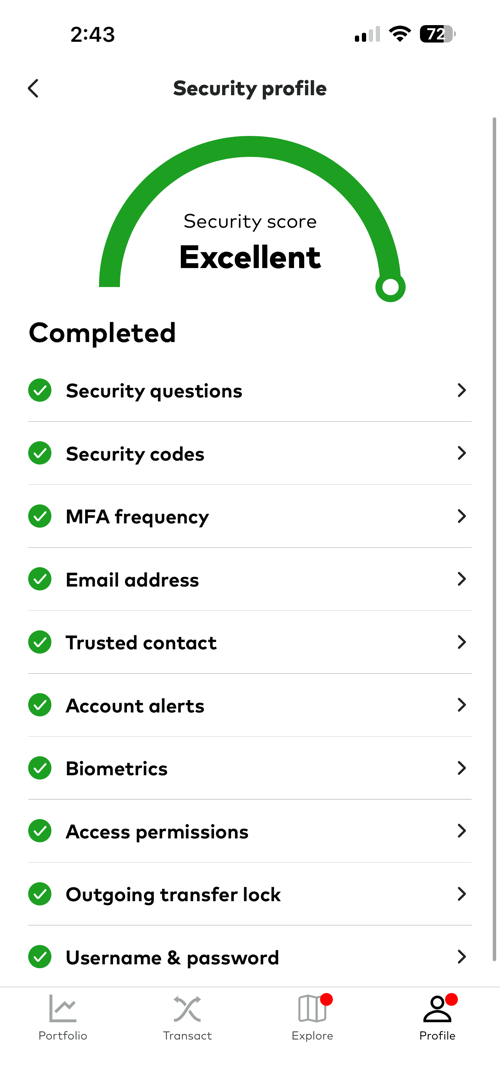
I came across this r/FidelityInvestment Reddit post today about how a Fidelity user had their account compromised (and also eventually restored). In the discussion about how the hackers might have gained access to the account, I learned about some new dangers. I’m not a security expert, but this is my understanding after reading about “pass the cookie” or “cookie hijacking” attacks. The FBI also put out this alert Cybercriminals Are Stealing Cookies to Bypass Multifactor Authentication.
First, obviously phishing is a very common attack nowadays, and for example, if you enter your Fidelity password on a website that looks like the Fidelity login page, then they have your password. But if you have 2FA, you are still protected, right?
A different danger is that malware or a malicious website may use “cookie hijacking” to steal the cookies in your browser that make it appear that you have logged in before. If you use the “trusted device” feature where they bypass the 2FA/MFA (2-Factor Authentication/Multi-Factor Authentication) requirements since you are logging in from a supposedly “trusted device”, then they can now access your account without needing that text message or Authenticator code.
In some cases, if you are actively logged into your account already, malware or a malicious website can even steal your “active session” cookie that makes it appear that you’ve already logged in and passed the authentication checks. Because the website thinks you’ve already logged in, they don’t ask for anything at all.
Here are some actionable steps to maintain the highest security:
- Only log into sensitive financial accounts using devices where you know the operating system and web browser are secure and updated.
- Don’t log in from public WiFi, even with https://. If you do, at least use a VPN.
- Turn off the “trusted device” feature that removes 2FA or MFA if you are logging in from a “trusted device” with the proper browser cookie. This is more hassle, but basically you always want to require more than one factor.
- Don’t check the “Remember me” box when you log in on a sensitive site.
- Log in to do your financial business, and then immediately manually click “log out” to delete that active session cookie on both your browser and the external server. Do not stay logged in while you visit other websites, or wait for the system to automatically log you out after 15 minutes or so.
Turning off the “trusted device” feature was the last thing I needed to do in order to score an “Excellent” score on my Vanguard security profile as well. 😎
 The Best Credit Card Bonus Offers – 2026
 Big List of Free Stocks from Brokerage Apps
 Best Interest Rates on Cash - 2026
 Free Credit Scores x 3 + Free Credit Monitoring
 Best No Fee 0% APR Balance Transfer Offers
 Little-Known Cellular Data Plans That Can Save Big Money
 How To Haggle Your Cable or Direct TV Bill
 Big List of Free Consumer Data Reports (Credit, Rent, Work)
1) Use a separate browser for banking
2) Or use a separate data directory to isolate your banking activity; my understanding is that Edge will run completely separate instances of the browser when different data directories are used so there is no issue with shared memory or being able to access cookies, etc.
To remind me not to use a given browser instance for the wrong thing, I had Gemini create a custom extension to give me a warning if I access a domain that is not in my bookmarks. It gives me the option to add the site to my whitelist, just allow this time, or block. I think there were some extensions like this available but I felt more comfortable using my custom one that I know is not sending any info anywhere.
I now use multiple browser data directories & shortcuts; the default is for general access, doesn’t use the extension and allows all cookies. The others (including one for banking) use the extension, have settings set more secure, and have cookie creation restricted to just what is necessary. FYI It can be a bit of a pain getting the right domains allowed so that sites function properly (google & yahoo in particular). Yes, If I turned off trusted devices it might be even more secure, but those MFA codes every time you login are annoying. I’m happy with the security that I believe this siloed architecture provides.
I’ve probably taken things a bit to the extreme, but I believe using a separate data directory would be the minimum necessary to isolate your banking activity (Edge & Chrome with –user-data-dir; it can be done with Firefox with the right cmdline arguments; for Safari it looks like you’d have to run the instance as a completely different user).
I own an IT company, and getting the basics right is the most fruitfil for the majority of users.
Most people use weak passwords on e-mail. If your e-mail is compromised you can request a password reset and get all the info you need to compromise an account. Or spyware infested computers and particularily android phones, espeically rooted ones. (I do this)
Here are my recomendations.
Do not use your e-mail as a login, use a randomly generated user name and password at least 16 characters long. Store the login credentials using a password vault with a password manager. Please do not use words, do not re-use passwords, make yourself aware of the time-to hack graphs.
Enable MFA on all accounts, do not use e-mail or SMS as a 2nd factor. Use a MFA app, or a token.
Keep your MFA app on a secure device I do not use my personal phone for my clients MFA access
Make sure you have good processes in place. Have transfers require MFA, and a call verification, that they can’t be just executed.
Do not login into accounts and have them remember you as a trusted device. Always have them 2FA (I do this)
Do not install MFA apps on your computer, spyware will compromise that
Do not log in as Admin on any device (I do this on all my computers)
HTTPS is secure a VPN isn’t necessary but it does add a layer of security, get the password right, MFA right and that solves 99% of the problems.
Token theft it real and so are man in the middle attacks. These can be thwarted by using sign out of all devices when you leave.
Do a credit freeze
Remember you’re not a target, unless you have a lot of money, a lot is a 1 million a month in profits. Most of us aren’t worth the time, we are targets of opportunity. So if we pass the door jiggle test threat actors won’t persue you.
There are many many others, but these will save most people who are not targeted.
Using a hardware security key with FIDO2 where possible is the way to go, in my opinion. Followed by an authenticator app generating one-time codes OATH-TOTP (preferably one that store the secrets in a hardware security key). And having at least two such hardware security keys (better yet a third off-premises backup).
Hardware keys cost money but in my opinion are well worth it.
I wished financial institutions were more invested in abandoning SMS one time codes and universally adopting FIDO2 passkeys.